
GOODCAR - VIN & Plate Lookups
Infopay Inc.Auto & Vehicles
4.446.00 Reviews
- Version
- 2.2.8
- Installs
- 10.00K
- Age Rating
- Everyone
Screenshots
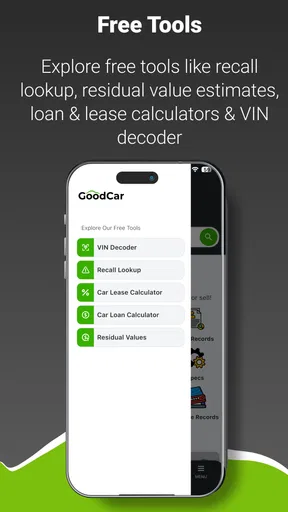
Our Review of GOODCAR - VIN & Plate Lookups
 Analysis by Appyee
I approached GOODCAR - VIN & Plate Lookups as a practical vehicle-research tool rather than another driving companion. That distinction matters. It is designed for the moment when you are trying to understand a car’s background, compare a possible purchase, or make sense of information connected to a vehicle before spending money on it. Developed by Infopay Inc., it sits in the Auto & Vehicles category and is free to install, with optional purchases ranging from about ten to twenty-five dollars per item.
My overall impression is that the app makes the early stages of vehicle research easier to organize. Instead of jumping between general web searches, dealership pages, and scattered notes, I can start with a vehicle identifier and keep the investigation focused. It is not a substitute for a mechanic, a test drive, or official paperwork, but it can be a useful first filter when I want to decide whether a car deserves closer attention.
How the current version fits into real vehicle research
The current release is version 2.2.8, and the app has been available since April 10, 2024. That gives the product a relatively recent starting point while still showing that it has moved beyond a brand-new launch. Its average rating is 4.4 from roughly three hundred ratings, and the app has passed ten thousand installs. Those figures suggest a modest but real user base rather than a heavily established automotive platform.
What I like most about this kind of tool is the change in mindset it encourages. When I see a used car listing, the tempting reaction is to focus on the photographs, mileage, trim level, and seller description. A lookup app encourages me to pause and investigate the vehicle itself. That is especially helpful when a listing looks unusually cheap or when the seller provides only a small amount of background.
The app’s purpose is straightforward: use a VIN or plate-related lookup to support vehicle research. In practice, that makes it most relevant to buyers, private sellers, owners checking a vehicle’s identity, and anyone who wants more context before making a decision. It is less relevant to someone looking for navigation, fuel prices, maintenance reminders, roadside assistance, or a digital garage. Those are different jobs, and this app should not be judged as though it were trying to perform them.
I also found that the value depends heavily on the question I bring to it. If I only want a quick way to browse cars, a marketplace app is more convenient. If I want repair advice, a specialist service may be better. GOODCAR becomes more useful when I already have a specific vehicle in mind and need a structured starting point for checking it.
A realistic buying scenario
Imagine I find a used sedan advertised by a private seller. The photos look clean, the description is brief, and the price seems attractive. Before arranging a long trip to see it, I can use the vehicle details in GOODCAR to begin a background check. I would save the listing, confirm that the identifier supplied by the seller matches the vehicle I am considering, and treat the resulting information as a screening step.
The important workflow is not simply entering a number and accepting the first result. I would compare the lookup details with the car’s visible identity: the dashboard VIN, paperwork, license plate, model description, and the physical vehicle. If something does not line up, that is a reason to ask questions before arranging payment or travel. This cross-checking habit is one of the app’s most useful practical roles, even though it requires judgment outside the app.
For a buyer comparing several cars, I would use the same process consistently. Research each candidate before becoming emotionally attached to one listing. That helps prevent the common mistake of overlooking warning signs because a car looks good or because the seller is applying pressure. The app does not make the decision for me; it helps me decide which vehicles deserve a closer inspection.
What the app does well for first-pass checks
The strongest part of the experience is the focus. Vehicle research can become messy because relevant information is spread across listings, documents, seller messages, and inspection notes. A dedicated lookup app gives the process a clear starting point. I can begin with the vehicle identifier instead of searching broad phrases that produce unrelated results.
That focus is particularly helpful for people who are not confident with automotive terminology. A buyer does not need to understand every mechanical system before starting an investigation. The app can serve as an accessible bridge between a basic listing and a more informed conversation with a mechanic or seller.
Another useful insight is that a lookup should be treated as a comparison tool, not merely a report-reading exercise. I would compare what the app presents with the seller’s wording. If the seller describes a vehicle one way but the lookup points to a different identity or history context, I would slow down. Even when the information appears consistent, I would still inspect the car in person.
For sellers, the app can also support preparation before creating a listing. Checking the vehicle details first can help avoid publishing an incorrect identifier or describing the wrong model information. That does not replace professional documentation, but it can reduce avoidable confusion when potential buyers ask questions.
How the product has evolved so far
The move to version 2.2.8 is the clearest sign that the product has gone through continued updates since its initial release. I would interpret that as evidence of ongoing maintenance rather than proof of a specific new feature. The version number alone does not tell me that a particular lookup source, screen, or report has changed, so I would avoid assuming that every update dramatically changes the experience.
For existing users, the practical benefit of a maintained version is continuity. A current app is generally preferable when I am performing a time-sensitive vehicle check, especially if I depend on the application to handle a lookup smoothly. New users also benefit from starting with the latest release instead of relying on an older installation that may behave differently.
The product’s evolution should be judged by whether it reduces friction in the complete research process. A useful update is not only a new button. It might make an identifier easier to enter, make results easier to understand, improve the path from lookup to follow-up action, or make repeated checks less confusing. Those are the areas I would pay attention to as the app continues developing.
At the same time, I would keep expectations realistic. A newer version does not turn a lookup into a guarantee. Vehicle records can vary by location and source, and a clean-looking result should never be interpreted as proof that a car is mechanically sound. The app’s evolution can improve access to information, but it cannot remove the need for inspection and documentation.
What existing users should know before relying on it
If I were already using the app, I would make version 2.2.8 my reference point and check that the installed version is current before starting an important search. I would also keep my own notes outside the app for vehicles I am comparing. That is a small but valuable habit because buying decisions often involve several listings, seller claims, inspection appointments, and price discussions.
I would be especially careful with paid lookups. The app is free to install, but individual in-app purchases can cost roughly ten to twenty-five dollars. That means I would not spend money casually on every vehicle I see online. I would first narrow my list using the listing quality, seller responsiveness, visible identifiers, location, and basic suitability. Then I would reserve a paid lookup for cars that remain serious candidates.
This creates an important trade-off. Paying for a report may be worthwhile when a vehicle is expensive, far away, or difficult to replace. It may be poor value when the seller refuses to show the VIN, the listing already contains contradictions, or the car is clearly not suitable for my needs. In those cases, I would walk away rather than pay to investigate a questionable lead.
I would also explain the purchase to less experienced buyers before they use it. A paid result is an information service, not an insurance policy. It can help identify questions, but it does not promise that every accident, repair, ownership event, or mechanical defect will appear. The best use is to combine the result with a physical inspection, a road test, and a review of the vehicle’s documents.
Where it falls short compared with familiar alternatives
Compared with a general web search, GOODCAR offers a more direct vehicle-focused path. A search engine is useful for finding broad advice, local mechanics, recall discussions, and owner experiences, but it can also produce noise. The app is better when I have a specific identifier and want to begin with the vehicle rather than with general automotive topics.
Compared with a marketplace app, however, it is not the place I would start when I am still deciding what type of car to buy. Marketplaces are better for browsing inventory, filtering by location, viewing photographs, and contacting sellers. I would use a marketplace to find candidates, then use a lookup tool to investigate the strongest candidates.
Compared with a mechanic’s inspection, the app is faster and easier to use, but much narrower. It cannot replace checking the engine, transmission, suspension, tires, brakes, fluids, frame, warning lights, or signs of poor repairs. If I were spending a significant amount on a used vehicle, I would regard the app as an early screening layer and the inspection as the decision layer.
Compared with official vehicle agencies or manufacturer resources, the app may be more convenient for starting research, while official sources remain important for formal records, registration matters, recalls, and region-specific requirements. The best approach is not to choose one source blindly. I would use GOODCAR to organize questions, then confirm important points through appropriate official or professional channels.
Small workflow improvements that make a difference
My first tip is to copy the identifier carefully and check it character by character before interpreting the result. A single mistaken letter or number can send the search toward the wrong vehicle. When possible, I would compare the identifier from the app with the physical VIN and the paperwork rather than relying only on a seller’s message.
My second tip is to research before negotiating, not after agreeing on a price. If a lookup raises questions, I want those questions answered while I still have room to reconsider. Waiting until money has changed hands turns useful information into damage control.
My third tip is to use the app as a conversation guide. I would write down specific questions based on the result and ask the seller for documents or explanations. This is more effective than making a vague statement that the vehicle “looks suspicious.” Clear questions encourage useful answers and make evasive behavior easier to notice.
My fourth tip is to compare multiple candidates using the same standard. It is easy to investigate one favorite car deeply and give the others only a quick glance. A consistent workflow produces a fairer comparison and reduces the chance that excitement will override caution.
Finally, I would separate identity checks from condition checks. Confirming that a vehicle matches its description is one task. Deciding whether it is safe, reliable, and worth the asking price is another. Keeping those tasks separate prevents the app from receiving credit for things it was never designed to establish.
Who should use it and who should skip it
I think the app is a good fit for a careful used-car buyer who already has a VIN or plate detail and wants an efficient first step. It is also useful for someone comparing private listings, preparing questions for a seller, or trying to avoid wasting time on vehicles with unclear information. New car shoppers may appreciate the straightforward research angle, provided they understand that the results need context.
It is less suitable for a driver who wants an all-purpose car ownership hub. If my main needs were navigation, maintenance scheduling, insurance management, fuel tracking, or roadside support, I would choose a different category of app. GOODCAR is specialized, and that specialization is part of its value.
I would also skip it when I have no concrete vehicle to investigate or when I am unwilling to follow up on what I learn. A lookup without a plan can become an expensive curiosity. If I am not prepared to inspect the car, ask the seller questions, or walk away from contradictions, the report will not improve my decision very much.
Parents and younger users should note that the app carries an Everyone content rating, but that does not mean every vehicle purchase is simple or low-risk. The financial and practical decisions surrounding a used car still require adult judgment, especially when paid lookups are involved.
What I would watch in future updates
As the product continues beyond version 2.2.8, I would watch for improvements that make paid research easier to evaluate before purchase. Clear explanations of what a particular lookup covers, how the result should be interpreted, and when it is most useful would help users spend more carefully.
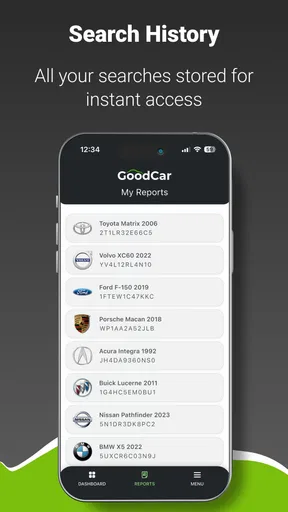
I would also value a smoother way to organize several vehicles without turning the app into a cluttered marketplace. Buyers often compare cars over several days, so a clear history or comparison workflow could make the research process more practical. Any such improvement would need to preserve the app’s focused identity rather than burying the lookup function under unrelated features.
Another area worth watching is clarity around regional differences. Vehicle records and plate-related information can depend on where a car is registered or documented. A user-friendly explanation of those boundaries would help people understand results without treating them as universal proof.
Most importantly, I would look for updates that improve interpretation rather than simply adding more information. A long report is not automatically a useful report. The best future direction would help ordinary buyers distinguish confirmed vehicle details, points requiring follow-up, and issues that demand professional inspection.
My final assessment for everyday buyers
GOODCAR - VIN & Plate Lookups is a focused, free-to-install Auto & Vehicles app from Infopay Inc. that makes sense when I have a particular vehicle to investigate. Its current version, 2.2.8, shows an actively maintained product, while its 4.4 average from around three hundred ratings indicates that users have generally responded positively. I would still judge it by my own workflow rather than by the rating alone.
The app’s real strength is helping me move from impulse to investigation. It can make a used-car search more deliberate, expose mismatches worth questioning, and give a buyer a sensible first filter before arranging an inspection. Its main limitation is equally important: it cannot replace a mechanic, official documentation, a road test, or common sense.
I would recommend it to anyone who regularly checks private vehicle listings or wants more structure before contacting a seller. I would use the free installation to understand the experience, then reserve any paid lookup for a serious candidate where the cost is reasonable compared with the time and money at stake. Use it as a screening and question-building tool, not as a final guarantee.
That is the balance that makes the app worthwhile for me. It does not need to solve every part of car ownership. It only needs to make the first research step clearer and more disciplined. When combined with an inspection and careful verification, it can be a practical addition to the used-car buying process; when treated as the only check, it is not the right choice.
Verdict
Strengths of GOODCAR - VIN & Plate Lookups
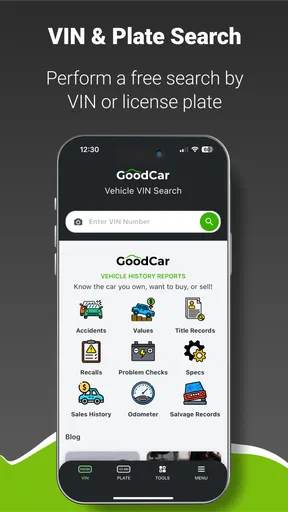
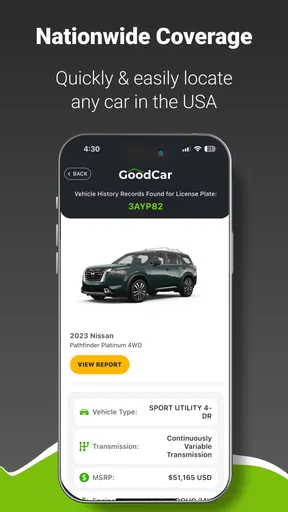
- Supports both VIN and license plate lookups in one app.
- Useful for checking a used car before arranging a purchase.
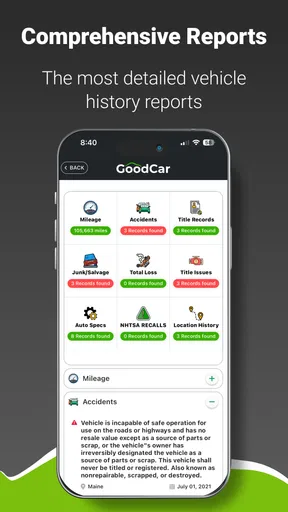
- Can reveal recalls and reported vehicle history details.
- Search results are presented in a simple, mobile-friendly format.
- Helpful for comparing information supplied by a seller.
Limitations of GOODCAR - VIN & Plate Lookups
- Available data can vary significantly by vehicle, country, and plate number.
- Some detailed reports may require payment or an in-app purchase.
- Plate lookup coverage may be limited outside supported regions.
- A clean report does not guarantee the car is mechanically sound.
- Results may not always include the vehicle’s latest ownership or service records.
Similar Picks in This Category
View All
Android Auto
Google LLC4.1

maxim — order a taxi & food
PT. SITO4.7

Штрафы ГИБДД: проверка с фото
Pays LLC – Штрафы ГИБДД4.7

Номерограм – проверка авто
Авто Ассист4.8

Дром Авто
Дром4.9

Frequently Asked Questions
What is GOODCAR - VIN & Plate Lookups used for?
GOODCAR is designed to help users research vehicles before buying, selling, or insuring them. By entering a vehicle identification number (VIN) or, where supported, a license plate, you can access available information such as reported accidents, title issues, mileage records, recalls, ownership-related events, and other history indicators. The amount of information depends on the vehicle, data sources, and your location.
Does GOODCAR provide a complete and guaranteed vehicle history report?
No vehicle-history app can guarantee that every event has been recorded. GOODCAR gathers information from available databases, but unreported accidents, incomplete insurance records, delayed updates, and differences between states or countries may affect the results. Treat the report as a useful screening tool rather than a final decision. For an expensive purchase, combine it with a professional inspection, maintenance records, and a test drive.
Is a VIN lookup different from a license plate lookup in GOODCAR?
Yes. A VIN is a unique 17-character identifier assigned to a specific vehicle and generally provides the most reliable way to match records. A plate lookup may be useful when the VIN is unavailable, but plate data can vary by jurisdiction and may be restricted by privacy or legal requirements. Whenever possible, compare the lookup details with the VIN printed on the vehicle and its official documents.
Does GOODCAR cost money to use?
GOODCAR may offer some basic information at no cost while charging for more detailed reports or additional vehicle-history features. Pricing, available report types, subscriptions, and regional availability can change, so review the purchase screen carefully before confirming payment. Check whether a plan renews automatically, what information is included, and how cancellation or refund requests are handled through the relevant app store.
What should I do if the information in my GOODCAR report appears incorrect?
If a report contains inaccurate, outdated, or mismatched information, first verify that the VIN or license plate was entered correctly and that the vehicle details match the car you are researching. Then contact GOODCAR support through the app or its official support channel, providing the report reference and evidence when appropriate. Do not rely on disputed information alone when making a purchase or insurance decision.
